Tuesday, October 9, 2012
From A Student's Perspective: Working on the Production of 'O Berkley, Where Hart Thou?'
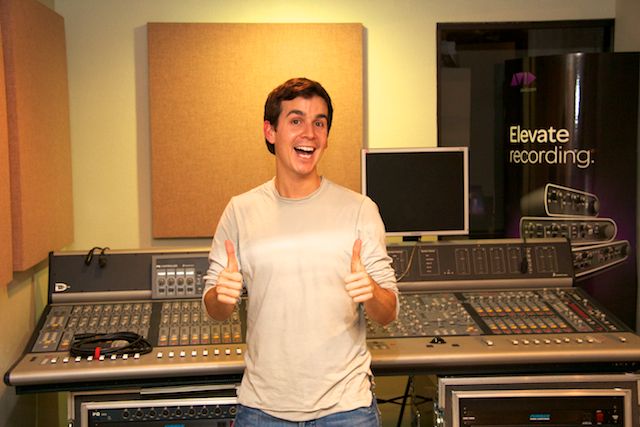
"Wow" is all I can say about my experience working on "Oh Berkley, Where Hart Thou?". I was excited going into this- but even more excited when it was over. The hands-on experience was like no other. I was able to hook up all our gear (one Millennia 8-channel pre, one Focusrite 4-channel pre, two Digi 8-channel pres, and all the Pro Tools gear- two 192's and the CPU). We delivered our microphone splitter the previous day and the theater crew had installed it into the audio system before we arrived. We brought a dozen nice studio mics to augment those supplied by the theater. I set up all the mics that were being used on stage, a couple room mics for the choir and four room mics to capture the audience. I was also responsible for striking the mics and setting them back up as needed while the show was progress. I actually felt like a big time sound guy. The show was at the Poway Theater for Performing Arts which is a beautiful venue. It was especially nice to get out of the classroom with some of my fellow students. We all got in on the action, the other students were running the video side of the gig. For me, this show was so helpful in learning about what it takes to put on such a big production. The time it takes to make everything run smoothly was a real eye opener. And thanks to all our hard work, preparation, and dedication to making every little detail perfect the show ran seamlessly. For any future students who have an opportunity to be part of something like this, jump on it. It is an amazing experience and everything I learned is invaluable.
Mike DiBernardo
Associate Degree in Recording Arts
The Recording Arts Center


Tuesday, September 25, 2012
RAD Students do Remote Record (and Video) at O Berkley, Where Hart Thou?
Four students in our Recording Arts Degree (RAD) program were tasked with the job of remote-recording and multi-camera video taping O Berkley, Where Hart Thou? at the Poway Center for Performing Arts this past weekend. The sold out theater enthusiastically cheered on an all-star line-up of San Diego's best country, folk, rock and bluegrass musicians as they recreated the Grammy Award winning soundtrack to O Brother, Where Art Thou?. Performed "Grand Ol' Opry style" around a shared microphone, legendary songs such as “Man of Constant Sorrow,” “In the Jailhouse Now,” “Oh Death,” and “I’ll Fly Away” received modern updates from the likes of host Jeff Berkley and Calman Hart (a.k.a. Berkley Hart), Steve Poltz, Gregory Page, Shawn Rohlf & the 7th Day Buskers, Dennis Caplinger, Robin Henkel, Lisa Sanders, Jeffrey Joe Morin, Robin Adler, Cathryn Beeks, Matt Silva, Tom Brosseau, The Lovebirds, and John C. Reilly and Friends.
 TRAC students Colin Tedeschi, Jorge Caballero, Danny Trujillo and Mike DiBernardo brought seven video cameras and a full 24-channel Pro Tools HD system with them to the theater to document the night's performance. Arriving at 2:00 p.m. the day of the show, the audio recording system included our own 40-channel Jensen transformer-isolated mic splitter which gave us independent control of microphone gain for each channel. Studio West Engineer Henrique Landim provided assistance with the audio setup and recording.
On the video side, we set up five HD cameras around the theater, including one in the balcony, two in the sound booth, one in the house, and one on the stage. We also had a roaming HDV camera backstage and two stationary cameras hidden on the stage. Students placed and operated the cameras guided by editor/shooter and TRAC ally Kigh Sturdevan. The students who participated in this remote project will be graduating from our Recording Arts Degree program in about three weeks, each student earning an Occupational Associates Degree in Recording Arts. This hands-on project is part of their requirement to complete the program and we're excited to hear the final mix with the multi-cam edit. Stay tuned for links to a few cuts from this show - we'll post them once they're finished!

On the video side, we set up five HD cameras around the theater, including one in the balcony, two in the sound booth, one in the house, and one on the stage. We also had a roaming HDV camera backstage and two stationary cameras hidden on the stage. Students placed and operated the cameras guided by editor/shooter and TRAC ally Kigh Sturdevan. The students who participated in this remote project will be graduating from our Recording Arts Degree program in about three weeks, each student earning an Occupational Associates Degree in Recording Arts. This hands-on project is part of their requirement to complete the program and we're excited to hear the final mix with the multi-cam edit. Stay tuned for links to a few cuts from this show - we'll post them once they're finished!
Tuesday, February 21, 2012
TRAC Alum News - Alfonso Wong Completes Project for Daniel Obst Advertising
We recently received an inquiry from Michael Krewitsky at Professional Sound and Music, who was looking for a qualified and polite Pro Tools user / student to help him with a request from a client. Daniel Obst Advertising wanted to create a continuous-play reel of their most popular advertising jingles to be featured on their website. Alfonso Wong, having demonstrated his skill and professionalism on several other off-site projects, was a natural choice for the job. Here's what he had to say about it:
 The agency had all of the sessions built in Digital Performer; I bounced them into Pro Tools multiple mono so there were 2 tracks, left and right. We used the workspace to audition all the tracks he wanted to use and then we dragged them into the regions list of a new session. I wrote down the names of all of the songs and gave Dan a copy so he could think about the order he wanted them in. I later transferred all of his sessions to my hard drive so I could work on them at home. The next time we met I had arranged the songs and done edits on them, and he had some additional editing and ordering requests. I cross-faded the end of some jingles so that they would start on the first beat of the next jingle, and then Audiosuite-ed the levels of all the jingles so they would all be at the same level. I used two stereo tracks because he had some jingles that faded in while others faded out. Then I made a master fader track, added a brickwall limiter and dither to it, bounced out the reel and converted it into a .wav and an mp3. I then transferred the session that I had created on my hard drive over to Dan's hard drive so he could have all of the edits and everything in the region list just in case he wanted to switch things around. We ended up with a 5-minute reel, which Dan seemed pleased with.
And here's what the client had to say about Alfonso:
Delightful, professional, blazing fast, exceeded expectations...Alfonso is a contributor, not just a button pusher.
Congrats, 'Fonz! We're proud of you! Keep up the great work!
Listen to the reel here.

And here's what the client had to say about Alfonso:
Delightful, professional, blazing fast, exceeded expectations...Alfonso is a contributor, not just a button pusher.
Congrats, 'Fonz! We're proud of you! Keep up the great work!
Listen to the reel here.
Tuesday, December 27, 2011
Countdown to the Degree Program - A Pictorial

We're very excited for January 9, 2012, when we will welcome 9 students to The Recording Arts Center for a 10-month Associate Degree Program in Recording Arts! We'll be posting 1 photo per day to show you all what we're doing to get ready...follow us on Twitter at @TRACSanDiego to see the pics!
Monday, December 5, 2011
Pro Tools 10 classes start on January 7, 2012!

We're excited about all the new features included in PTX! Here are just a few of them...
• The option to use 32-bit floating point processing
• Multi-format audio and multi bit-rate audio in the same session
• Significantly improved audio cacheing via RAM - allows for record and playback from network drives, raids, and previously unsupported USB drives
• Realtime fades and the integration of stereo interleaved files
• Regions are now referred to as "clips" throughout the program
• Avid Channel Strip plug-in included on all Pro Tools X systems
• Dynamics and EQ processors from the renowned Euphonix System-5 Console
• Clip-based gain, up to 36db change per clip in the edit window
• Improvements in Audio Suite functionality (handles now included when processing and multiple Audio Suite plug-in windows open at a time)
• Built-in iTunes and Sound Cloud support
We've scheduled an accelerated session of Pro Tools training for the first of the year, starting with Pro Tools 101 on January 7 - 9. Click here to see the full schedule or here to register!
Thursday, October 27, 2011
4 Basic Tips For A Better Recording
Have the entire band tune with the same tuner
Tuners can vary in their accuracy, so having the entire band tune with one tuner is a great way to ensure A = A for everyone. A hand-held tuner is about $30 bucks, but in a pinch Pro Tools comes with “TL InTune”, a plug-in tuner that can suffice. Have your musicians tune every 30 minutes to be sure tracks stay consistent.
Tune the drums before recording
Drums can – and should – be tuned. It isn’t difficult to Google your drum kit model and find out the “default” note to tune each drum. Drum Tuners can cost as little as $60 bucks and can stop a $700 kit from sounding like a $200 one. Without a tuner, drums can be hand-tuned by ear and feeling the amount of tension around the circumference of the drumhead.
Record to a click track
A performance that’s very close to perfect can easily be edited to perfection with built-in Pro Tools editing power to snap the performance together. Beat Detective and/or Elastic Time can help maintain the groove of drums and align the beats with the click and tempo meter. Then Elastic Time can be used to warp the bass performance to the drums. Basic editing – simple copy and pasting or nudging – can always be used to ensure the entire band hits on a downbeat or finale of a track.
Use a DI with your guitar and bass
Some amps don’t translate well through any microphone. Recording through a DI allows you to mix amp modelers like Eleven or Chrome Tone with your amp signal to beef it up. This helps to minimize the bleed from other instruments or the buzz from a noisy amp.
Brandon Papsidero
Engineer, Studio West of San Diego
Instructor, "Signal Processing with Waves"
Tuners can vary in their accuracy, so having the entire band tune with one tuner is a great way to ensure A = A for everyone. A hand-held tuner is about $30 bucks, but in a pinch Pro Tools comes with “TL InTune”, a plug-in tuner that can suffice. Have your musicians tune every 30 minutes to be sure tracks stay consistent.
Tune the drums before recording
Drums can – and should – be tuned. It isn’t difficult to Google your drum kit model and find out the “default” note to tune each drum. Drum Tuners can cost as little as $60 bucks and can stop a $700 kit from sounding like a $200 one. Without a tuner, drums can be hand-tuned by ear and feeling the amount of tension around the circumference of the drumhead.
Record to a click track
A performance that’s very close to perfect can easily be edited to perfection with built-in Pro Tools editing power to snap the performance together. Beat Detective and/or Elastic Time can help maintain the groove of drums and align the beats with the click and tempo meter. Then Elastic Time can be used to warp the bass performance to the drums. Basic editing – simple copy and pasting or nudging – can always be used to ensure the entire band hits on a downbeat or finale of a track.
Use a DI with your guitar and bass
Some amps don’t translate well through any microphone. Recording through a DI allows you to mix amp modelers like Eleven or Chrome Tone with your amp signal to beef it up. This helps to minimize the bleed from other instruments or the buzz from a noisy amp.
Brandon Papsidero
Engineer, Studio West of San Diego
Instructor, "Signal Processing with Waves"
Tuesday, October 25, 2011
Congratulations to Our First Avid Media Composer Certified User!
Michael Gervais, a TRAC student from Los Angeles, recently attended our Avid Media Composer Certification course. At the end of 5 intensive days he took the Certification Exam and passed it with flying colors! Congrats, Michael!

Subscribe to:
Posts (Atom)

 Posts
Posts

